
LP (Landing Page) Design Reference List
Daily updates of LP (Landing Page) design examples categorized by industry and style.LP (Landing Page) Design Reference List
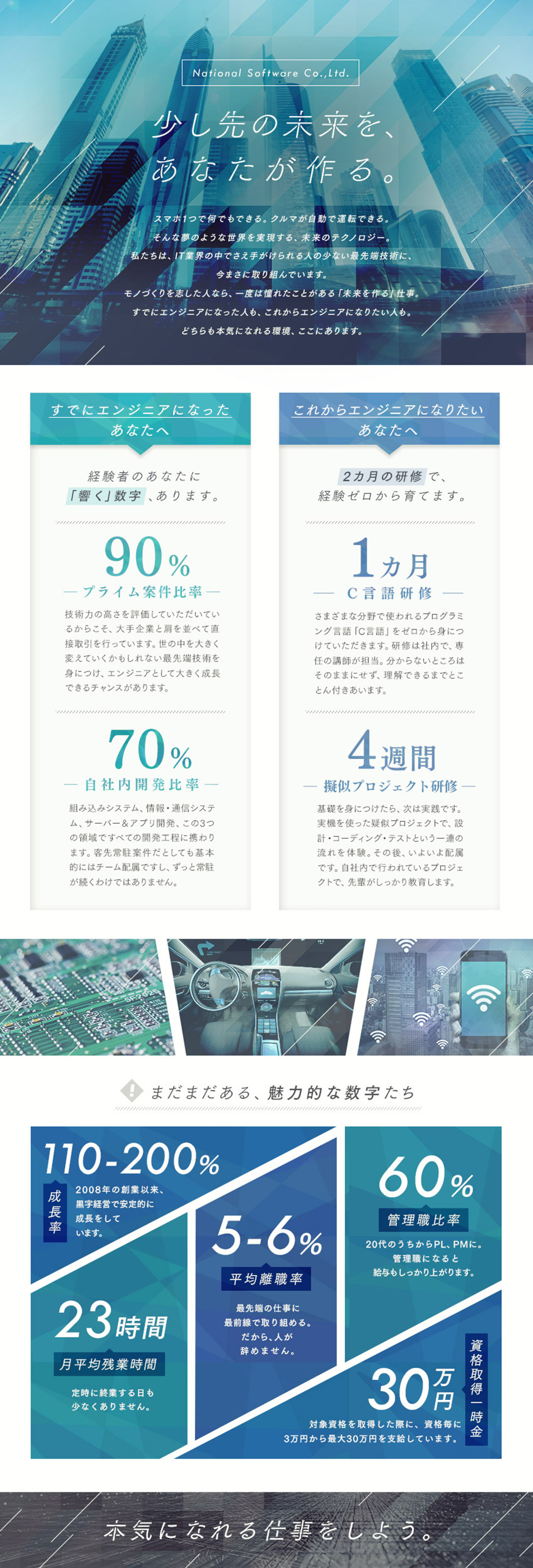
Daily updates of LP (Landing Page) design examples categorized by industry and style.Landing pages for IT engineers should convey both technical ability and human qualities. Depending on the purpose—recruitment, service introduction, or learning content—a design focused on trustworthiness and clarity will be most effective.

First, clarify the objective and design the information architecture. Depending on the goal—recruitment, service presentation, or learning content—define the hero section's main message and provide readable headings and clear navigation paths. Visualize technical strengths and responsibilities with bullet points and diagrams, and reinforce credibility by appropriately using sample code and screen captures. Place CTAs using noticeable colors and concise copy, minimize form input burden, and optimize for mobile. Choose colors and icons based on calm, industry-standard tones and tech motifs, and implement with readability and accessibility in mind.
Describe job duties and skill requirements concretely and objectively, avoiding misleading language or excessive exaggeration. If many technical terms are used, provide annotations or a glossary to help the target audience understand. For forms that handle personal information, keep input fields to a minimum and include a confirmation step before submission to prevent accidental sends. Choose images and icons that reflect reality and avoid over-stylization that could create unrealistic expectations. Prioritize readability with sufficient color contrast and font sizes, and always check page load speed and mobile rendering.
Motif: Laptop and code snippets
Color palette: Blue × White × Gray
This combination is suitable when emphasizing stability and reliability. Adding laptop or code screenshots and syntax-highlighting-style accents enhances technical credibility. Use a white background as the base to ensure readability.
Motif: Abstract circuits and grid lines
Color palette: Navy × Orange × White
This palette works when you want to convey innovation and a sense of speed. Using orange as an accent against a dark-toned background makes CTAs and key information stand out. It pairs well with dynamic diagonal layouts and animations.
Motif: Human silhouettes and checklists
Color palette: Green × Yellow × Dark Gray
A friendly combination suitable for recruitment or learning-focused landing pages. Using people icons, success badges, and progress-check motifs can lower the psychological barrier to apply or enroll. Use yellow accents to prompt action while keeping text stable with dark gray.

Check the list of catch phrases
You can check a list of the main catchphrases used on the landing page of the currently displayed design list, and use it as a reference when creating your own catchphrase.














What is an IT Engineer?
An IT engineer is a general term for professionals responsible for designing, developing, operating, and maintaining software and systems. Specializations vary widely—from developers who build services using programming languages and frameworks, to infrastructure engineers who manage servers and networks, to areas involving data processing and machine learning. Analytical skills to translate client requirements into technical solutions, communication skills to deliver results within a team, and a mindset of continuous learning are required. The role often includes bridging with the business side and responsibilities for quality and security, so a broad skill set beyond simply writing code is typically applied.